
WHITEPAPER
What it actually takes to design AI products people use — and build team processes that keep up
For over 20 years, I translated emerging technology into products people actually use — from the first wave of enterprise software to the conversational interfaces that are redefining what software even is. AI changes everything about how we do that work. This whitepaper is about what I've learned doing it.
That shift changes how we design. Users no longer click through menus — they “talk” to software that talks back. Getting that right is harder than it sounds.
Why this is important
The race to deploy AI in our processes and products is moving fast — what used to happen in years now needs to happen in weeks.
In most organizations, the process starts with a mandate from leadership, then teams rush to deliver. At the tactical layer where real work happens, we experience friction and need to deploy workarounds to achieve those goals. It’s important to share the real process so leadership can understand how we’re implementing their vision.
In this whitepaper, I describe how I’ve successfully implemented AI workflows that safely and effectively speed delivery and deliver products that customers need — it’s a blueprint for delivering real value; we don’t just check the box on delivering a technology.
AI tools and workflows drive innovation and velocity
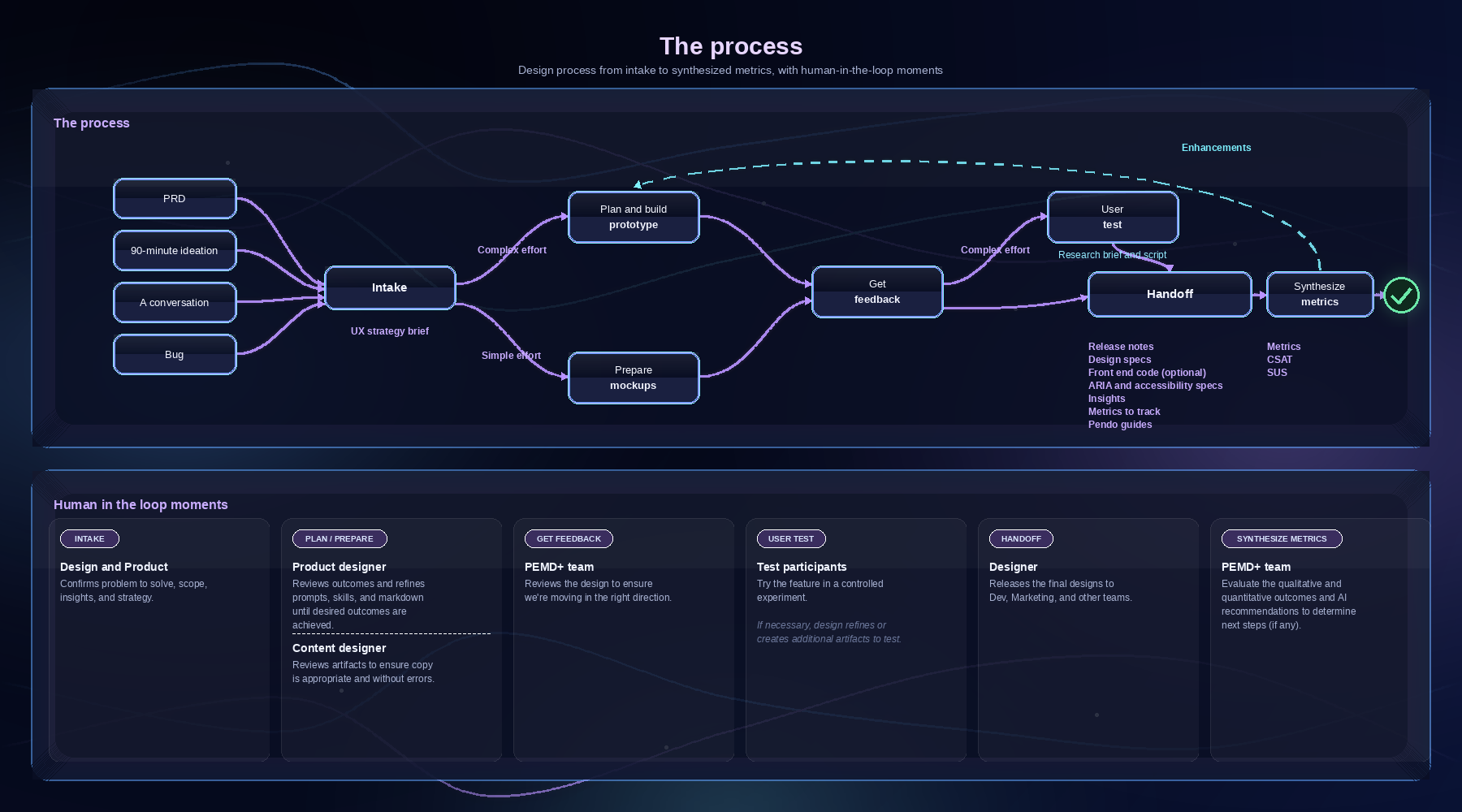
Traditional design artifacts fail to match the speed and complexity of autonomous systems. We solve this by transitioning teams to a production-ready AI design pipeline.
Designers pair with Product and Dev leads early to frame problems to solve and align on constraints and scope. The team may choose to:
Spike and evolve a concept
Conduct a 90 minutes from concept to prototype ideation session where the team quickly explores innovations and opportunities. This collaboration helps generate ideas from the Product, Engineering, Marketing, Design (PEMD) team, then leverages the designer’s unique skills to ensure the approach and prototype are on-brand and leverage best practices. The goal is to start with a sound foundation and then iterate on it.
If the work needs to address a specific requirement, we can start with an intake process to codify the team’s alignment. This ensures the team is moving in the right direction and avoids time-consuming realignments in the middle of the design process. We document the team’s alignment in a 1-page UX strategy brief that documents:
The problem to solve
Known insights
Insights to learn
Constraints
Known friction
Scope
RACI (which team members are “responsible”, “accountable”, “consulted” or “informed”)
Success metrics (how will we prove project success)
Alignment with a long-term vision
AI tech design stack supports the process
To accelerate the transition from design to code, we use a stack of technical design tools that facilitate rapid prototyping, maintain high standards for brand quality and usability, and eliminate the friction of traditional handoffs.
Figma is the system of record for key design concepts and components
Figma MCP moves design system data to Claude and back
Figma Connect helps developers see the code behind design components
Claude Code generates prototypes and Dev-ready artifacts
Claude Cowork helps designers synthesize information and explore design approaches
VS Code, CLI, and GitHub manage the environment and artifact versions
Confluence provides visibility into project information
Internal web server provides visibility into the work and helps us collect feedback
Storybook (optional) can be used to align design system components with development tasks and artifacts
Claude Code and Figma at the epicenter
Depending upon the complexity of the effort, the designer determines which of the following methods to use to evolve designs:
Option 1: Design key moments in Figma, then upload them to Claude Code
If there are legacy experiences, we can’t have Claude change them because it impacts legacy code or may be out of scope. So the designer starts by designing key moments first in Figma, then instructs Claude to generate experiences around that design.
This puts the designer as the orchestrator and decision-maker, and AI as the implementer of tactical details.
Option 2: AI-directed UI generation and generative prototyping
The designer is still the decision-maker, but instead of using mockups, we use specs and word-based instructions to achieve desired outcomes.
The designer specifies design details, such as the content and components, then AI visualizes a UI according to those “specs”.
The designer provides a narrative or describes desired outcomes, then AI uses the design system to generate a UI that supports the story.
Option 3: Design only in Figma
If the project involves just one or a few screens and only uses well-defined interactions, the designer may just create static mocks in Figma. This is often the quickest way to deliver a solution, and the artifacts can still be delivered using Figma MCP to Dev to provide the metadata needed to support frontend development.
Choosing the right approach
With the current technology, and even when informed with a design system, AI outputs need close inspection and corrections as AI:
Creates generic-looking outputs (that don’t reflect the brand)
Makes random layout choices that don’t quite make sense or align with the design system
Makes content errors or off-brand tone and voice
Often misses the information hierarchy that aligns with user goals
Adds visual complexity that doesn’t serve a clear purpose (such as tags, iconography, and colors), and
Changes legacy details that are out of scope and may confuse Engineering and users
(Source: NN/Group)
Because of this we have to select an approach that best aligns with production goals:
Option 1 Claude Code pipeline: when brand precision, accessibility compliance, or production quality matters.
Option 2 Generative prototyping: for rapid concept validation when speed outweighs fidelity — it's ideal for early alignment, not final delivery.
Option 3 Figma only: for well-scoped, interaction-light screens where the component is already defined, and the design work is primarily layout and content. In practice, most projects move through more than one mode.
Iterating to get the design right
In most instances, the designer uses a combination of techniques. Claude Code rarely creates an appropriate design on the first pass, either because it lacks sufficient details or hallucinates (aka makes stuff up to complete the task).
Claude sometimes delivers interactions and messaging that aren’t on point because it looks past the specific instructions and leverages other information it sees in the system. Designers have to be vigilant to segregate information and explorations that we don’t want Claude to accept as standard approaches and interactions.
Designers also have to be vigilant and inspect Claude’s thought process to ensure it doesn’t include information that’s not in scope or not intended for the current body of work. These errors and inconsistencies may not seem important, but if we allow them to continue without feedback, they can enter the dev pipeline and:
Contaminate the design system and vocabulary
Create inconsistencies across the product that confuse users
Interfere with usability testing, or
Create an experience that looks unpolished, inappropriate, or sloppy
It’s best to keep the pre-production environment isolated from discovery prototyping. This gives teams the freedom to break the rules while they explore concepts without impacting the team’s ability to train AI on the proper expression of product features and experiences.
Key skills and markdown files
We automate design outcomes by codifying constraints and brand standards directly into Claude Code’s world via skills and markdown files. This turns the traditional handoff into a high-speed collaboration to produce near production-ready artifacts.
Because Claude is connected to Figma using a bi-directional MCP and Figma Connect, design system details and any updates are accurately communicated from Claude or Figma into the production handoff. Other criteria are communicated in these files:
Prototype plan, defines the standards and steps (strategy, build, test, etc.) needed to create a prototype
UX strategy brief tells Claude what the project is about and which personas the project is for, and other key details from the intake session
Personas, a detailed description of the goals and characteristics of a persona
Vocabulary describes terms used by each persona
Tone and voice describes the type of language used to create experiences that have a singular, appropriate brand voice
JTBD describes the jobs and goals the user hired the system to perform
Relevant user insights, a synthesized collection of insights from across the company that should be considered and accepted as truth when solving the problem
Narratives, a short, memorable story of the user’s experience and desired outcome (because it’s easier to remember a story than a collection of features, this artifact facilitates a common understanding of desired user outcomes amongst the team and amplify empathy for users)
Content design, like a narrative, may describe what the user asks and any clarifying questions the system is likely to ask (after all, the UI is just a representation of that conversation; content designs help the designer and Claude know that likely conversation)
Brand style, rules that define how to create experiences that consistently use the brand’s voice and assets
Longform content structure, one of the most challenging outcomes of using conversation AI is the conversation. Systems can return “walls of text” that are difficult to parse and contribute to user fatigue and difficulty. Defining how long-form content is structured improves the accuracy and desirability of AI responses. In most instances, these rules encourage the AI to return a scannable summary and opt-in to see more verbose content.
Accessibility criteria define which accessibility standards we need to meet
Release notes document the standard format for a description of what’s delivered, how it addresses specified requirements, and other details that inform downstream tasks
Figma MCP connects the two worlds
Figma MCP and Connect are the bridge between design and code. We document design system rules AI can follow to move teams from static references to functional, version-controlled, dev-ready components.
Every generated artifact stays on-brand and useful. Production-ready designs ship through the GitHub repositories, meeting engineers exactly where they work.
As prototypes and production code are developed, the design system may need to be updated accordingly. The Design team reviews and approves proposed new components and interactions to formally include in the design system (or proposes that the team use existing components instead).
It’s important to be vigilant and not introduce too many design system components. The more components that Claude has to consider, the greater the likelihood that Claude will make mistakes, hallucinate, or use more context than necessary for an operation.
Grounding AI on the persona's needs
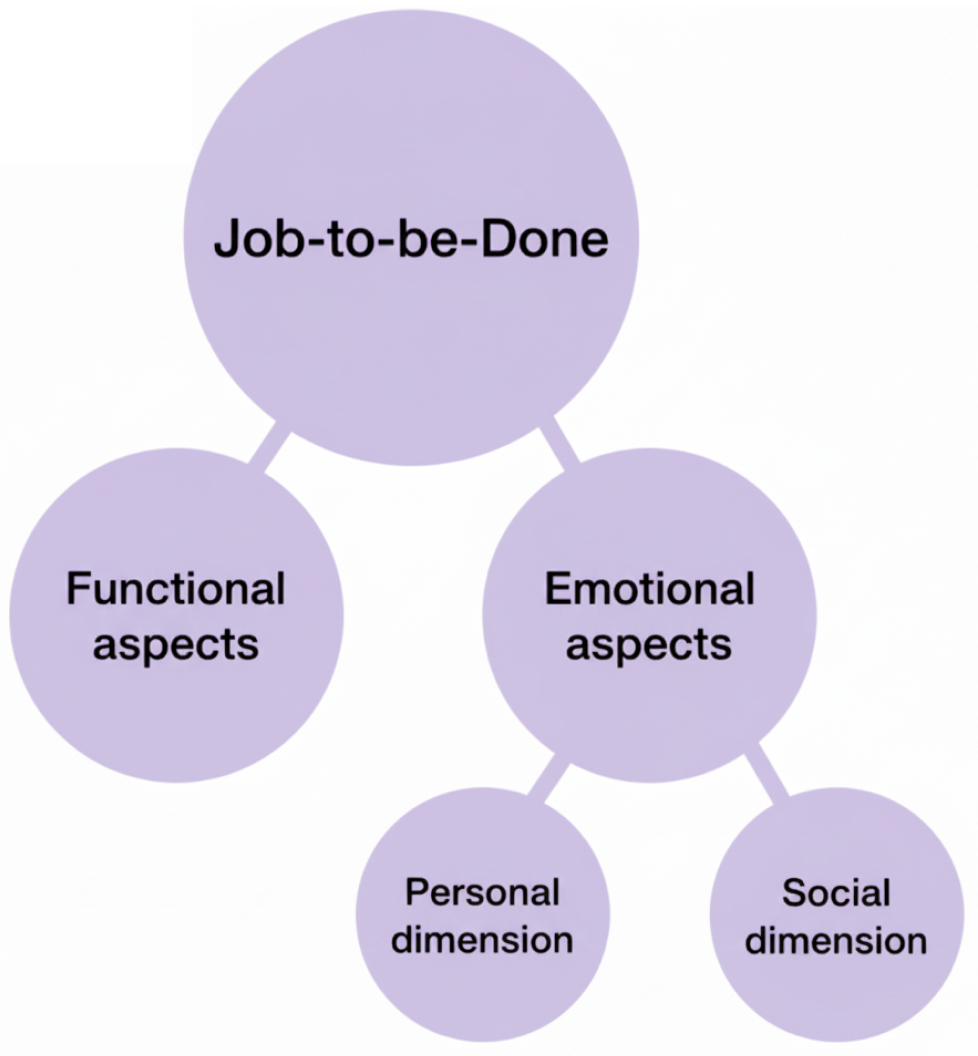
To keep AI focused on human needs, we use the Jobs-to-be-Done (JTBD) framework as a primary skill in the configuration. JTBD is a product development and marketing philosophy that focuses on the core functional, emotional, and social “job” a customer hires a product to do.
JTBD grounds every output in what the user is actually trying to accomplish. We can use the framework to guide the user to clarify what they’re trying to do. We can also use jobs and their underlying tasks and KPIs to offer users prompts they can select as they clarify their goals. This also helps reduce AI calls as these selections are made with canned prompts or app menu options.
Meet developers where they live
We remove the friction of traditional handoff by delivering designs directly through GitHub repositories. Engineers can receive near production-ready artifacts — including accessibility ARIA labels and tab order — so they can build accessible, functional features and interactions without guesswork.
This pipeline transforms the gap between design and engineering into a high-speed collaboration: the team ships more, debates less, and stays aligned on what on-brand means.
The design system is no longer just documentation for developers. Through design tokens, component APIs, and tools like Figma's Code Connect, it becomes instructions for a machine — enabling AI to generate on-brand, accessible code directly from the system that defines your product's visual language. What used to live in a Confluence page now lives in the model's context.
The payoff
The real payoff isn't just speed — it's alignment. When designers build front ends in the same environment where engineers build, and when product managers see a near-functional artifact instead of a static mockup, the conversation changes. Teams stop debating what something should look like and start making decisions about whether it solves the right problem.
On projects where I've run this pipeline, we've identified critical interaction gaps and business logic conflicts weeks earlier than a traditional handoff process would have surfaced them — before those issues became expensive engineering rework.
People don’t buy AI, they buy solutions
AI adoption is moving fast, but the AI experience is still evolving. To get products to market fast, many companies simply put a prompt on the page and focus on delivering the backend technology to enable AI to leverage existing data.
It’s crucial to also deliver the capabilities users need
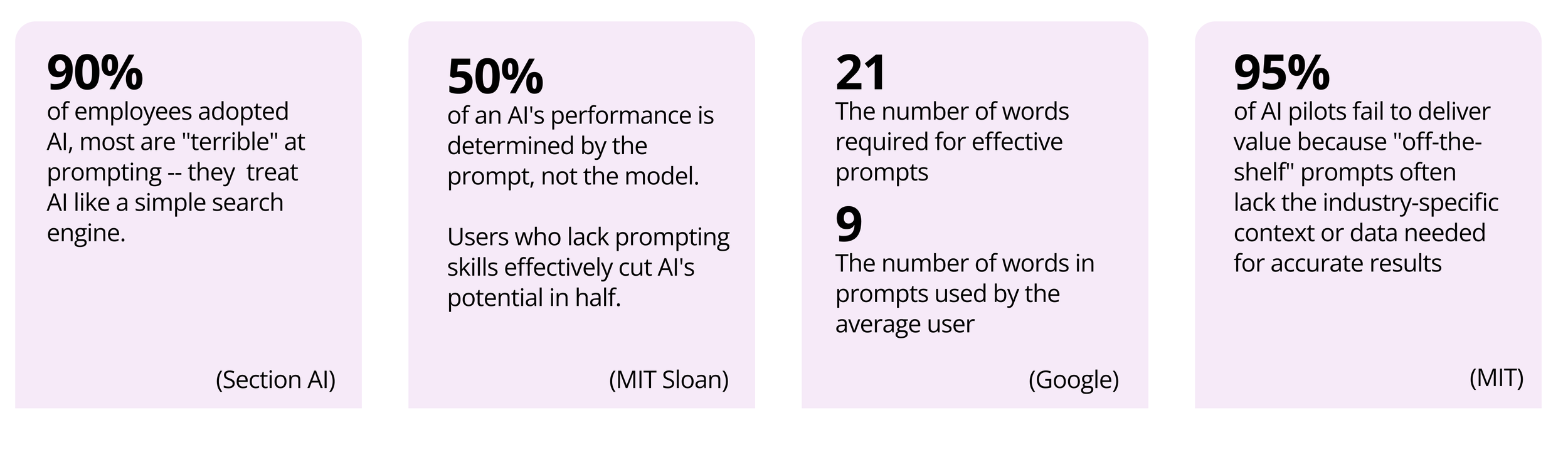
Research from Nielsen Norman Group and others consistently show that users struggle to formulate effective AI prompts — particularly for complex or unfamiliar tasks. When users can't ask well, AI systems underdeliver, and trust erodes fast. (NN/Group)
We can solve this by providing the scaffolding — interactions and suggested prompts — that guide users to successful outcomes. We also leverage user journeys and service blueprints to ground every solution in a real human need rather than optimizing for technology for its own sake one-size-fits-all.
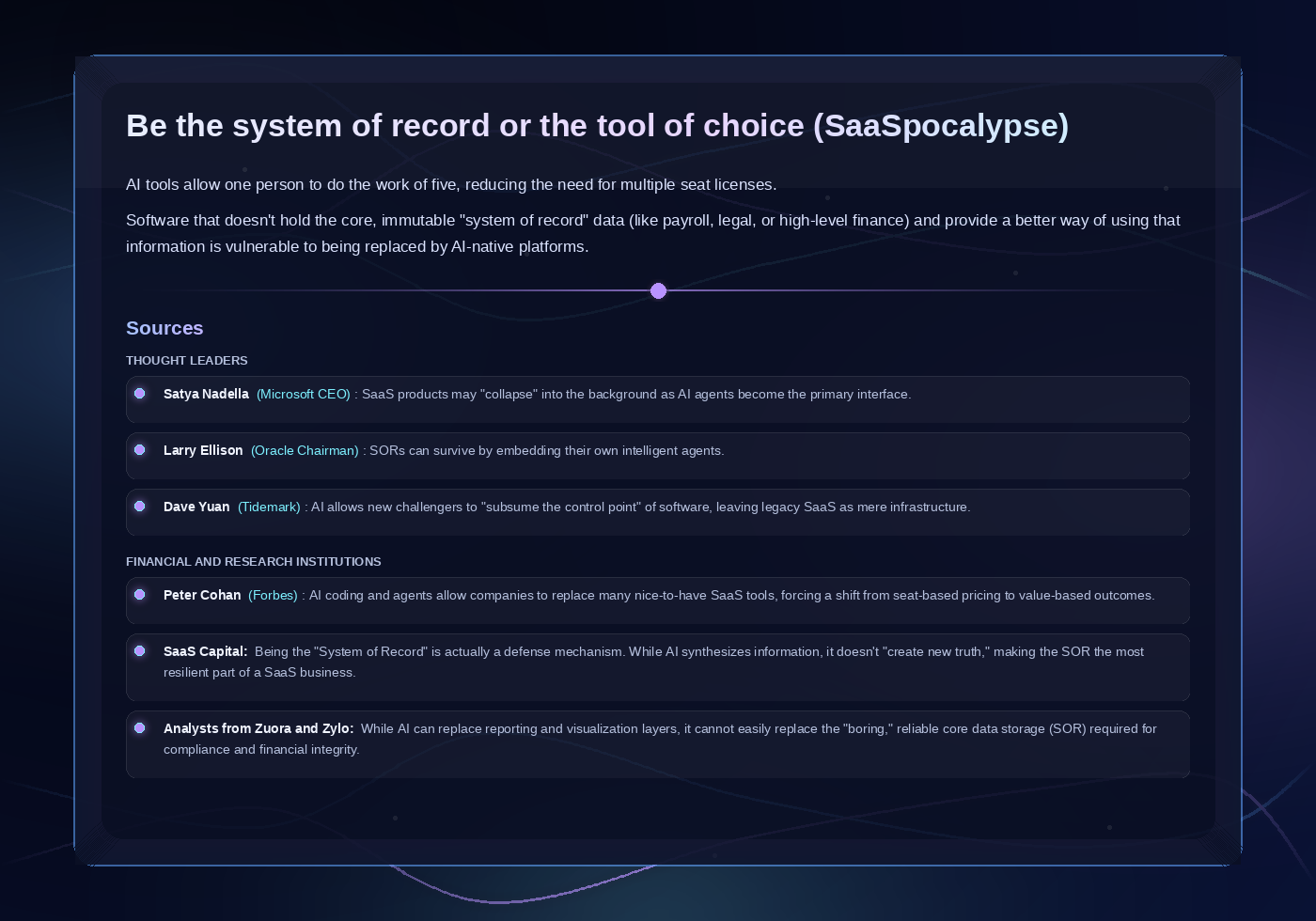
Product teams need to defend and grow their value proposition
Multiple thought leaders warn that customers may use AI to replace multiple seats and perform tasks normally performed in an app’s UI. This reduces a SaaS provider to becoming just a system of record (SOR) instead of a solution provider.
Companies that want to protect their market must provide superior experiences that make it easier and more desirable to use their products instead of a “one-size-fits-all” generic co-pilot.
GenUI UX components provide context and facilitate the conversation
In addition to guiding AI to understand the user’s jobs to be done, we can provide dashboards and other experiences that aggregate the key insights, actions, and jobs to be done (JTBD) — the tasks and goals users are trying to accomplish.
Designers must also deliver frameworks that display the real-time status of key tasks and provide access to actions that humans need to perform. As humans, we’re bombarded with digital messages and interruptions, so designers need to provide a view of these items that’s concise and consumable. To expect that users can synthesize walls of unstructured text, or communicate using a sequence of several prompts is unrealistic and only introduces friction into a user’s workflow.
To do this, designers need to deliver a collection of generative UI (GenUI) components that AI can provide on-demand to help users clarify intent, then consume and use responses. For example, AI may deliver tabular information; instead of the user prompting AI to format or filter the results, it may be more expeditious to provide a simple interaction to guide the user to specify what they need.
The design response to this isn't to make the prompt box bigger or add placeholder text. It's to create an experience so users don't need to prompt in the first place. That means designing the conversation the system has with the user — not just the UI that wraps it.
Gen UI — AI generates forms on other components when needed
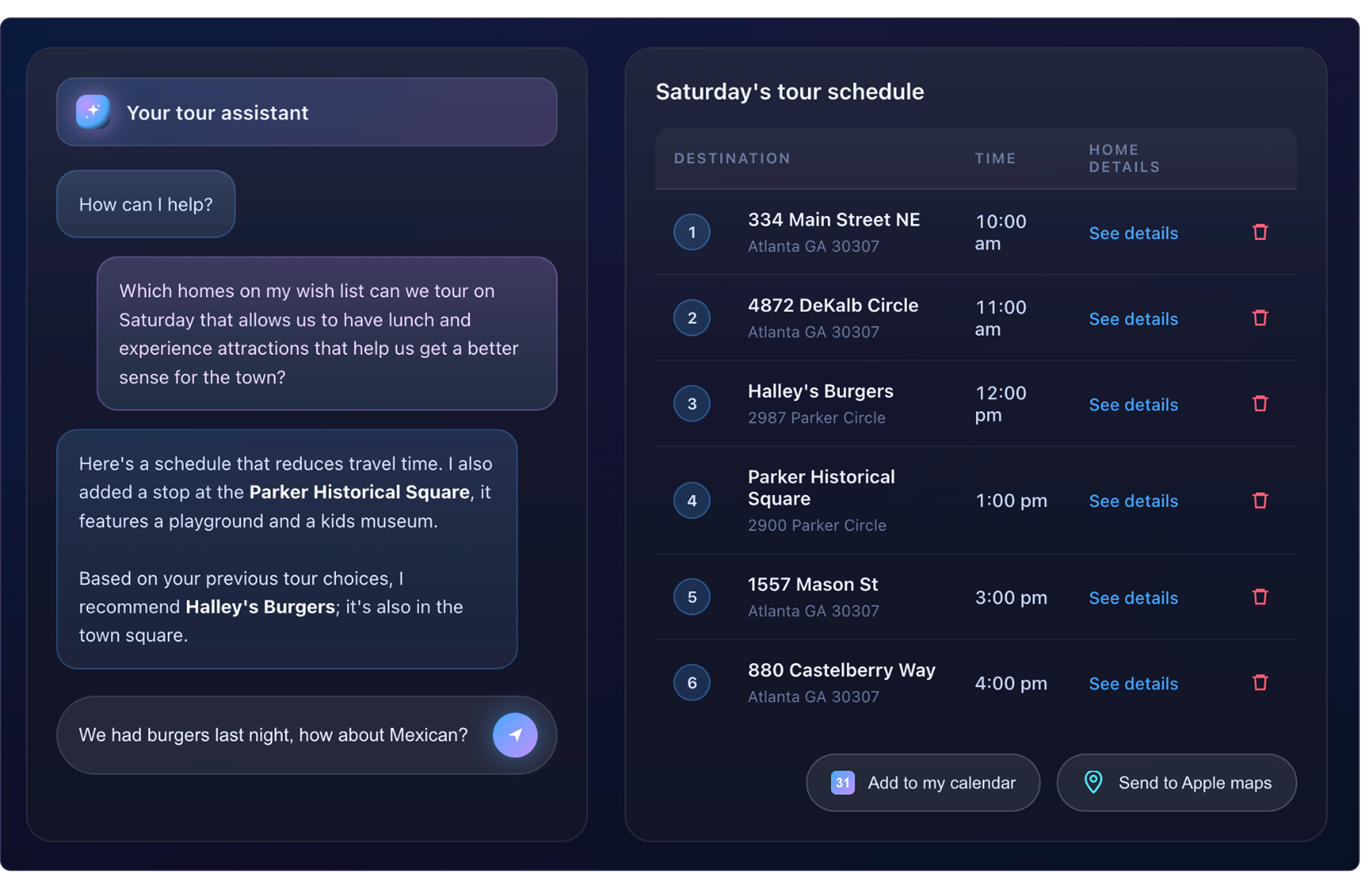
Interaction models and multi-turn patterns deliver the right experiences
To deliver agentic design that’s fit for purpose and makes experiences easy and useful, we can also:
Train and configure AI experiences that are tailor-made for the jobs users need to perform
Deliver meaningful insights and actions based upon the app’s underlying data in a way that elegantly supports the user’s goals
Define conversational sequences (multi-turn patterns) that help AI and users engage in multiple back-and-forth exchanges (turns) as they consume information and make decisions. These patterns maintain context across turns, enable follow-up questions, clarifications, and richer responses — including retrieval-augmented generation (RAG), where the system pulls relevant external data to ground its answers in real context rather than relying on the model alone.
Define wedge experiences — experiences that sit between the raw AI output and the user that reduce friction, bring clarity, and collect the signal that helps the system learn and adapt over time. This is where we deliver real product value.
The experience is the conversation between the system and the user, and when we get that conversation right, we build products people can trust to act on their behalf.
Explainability patterns that show the logic behind system decisions
Trust is the hardest AI design problem.
Explainability patterns keep the human in the loop and show the rationale behind AI-generated outputs to ensure users remain the primary decision makers. When a model makes an error, a well-designed explainability pattern transforms a potential hallucination into a learning moment rather than a breakdown in trust.
Product and content designers ensure that those patterns are anticipated and appropriately defined.
The payoff
Shipping fast matters less if users don't trust what they're interacting with.
On AI-powered products, I've seen the difference between designs that explain their reasoning and designs that don't — in adoption rates, in support ticket volume, and in the qualitative feedback users give.
When explainability and wedge patterns are built into the experience from the start, users engage more deeply, escalate less, and return. That's not a soft outcome. It's the difference between an AI feature that gets quietly deprecated and one that becomes core to the product.
At Zillow, we learned this firsthand. A purely conversational AI experience performed poorly in user testing — users found it slower and more effortful than expected. The approach that resonated was ambient personalization: AI surfacing relevant homes and financial context directly on the page, without requiring the user to ask. The interaction was invisible; the value wasn't.
See the Zillow case study
Strategic metrics and business outcomes
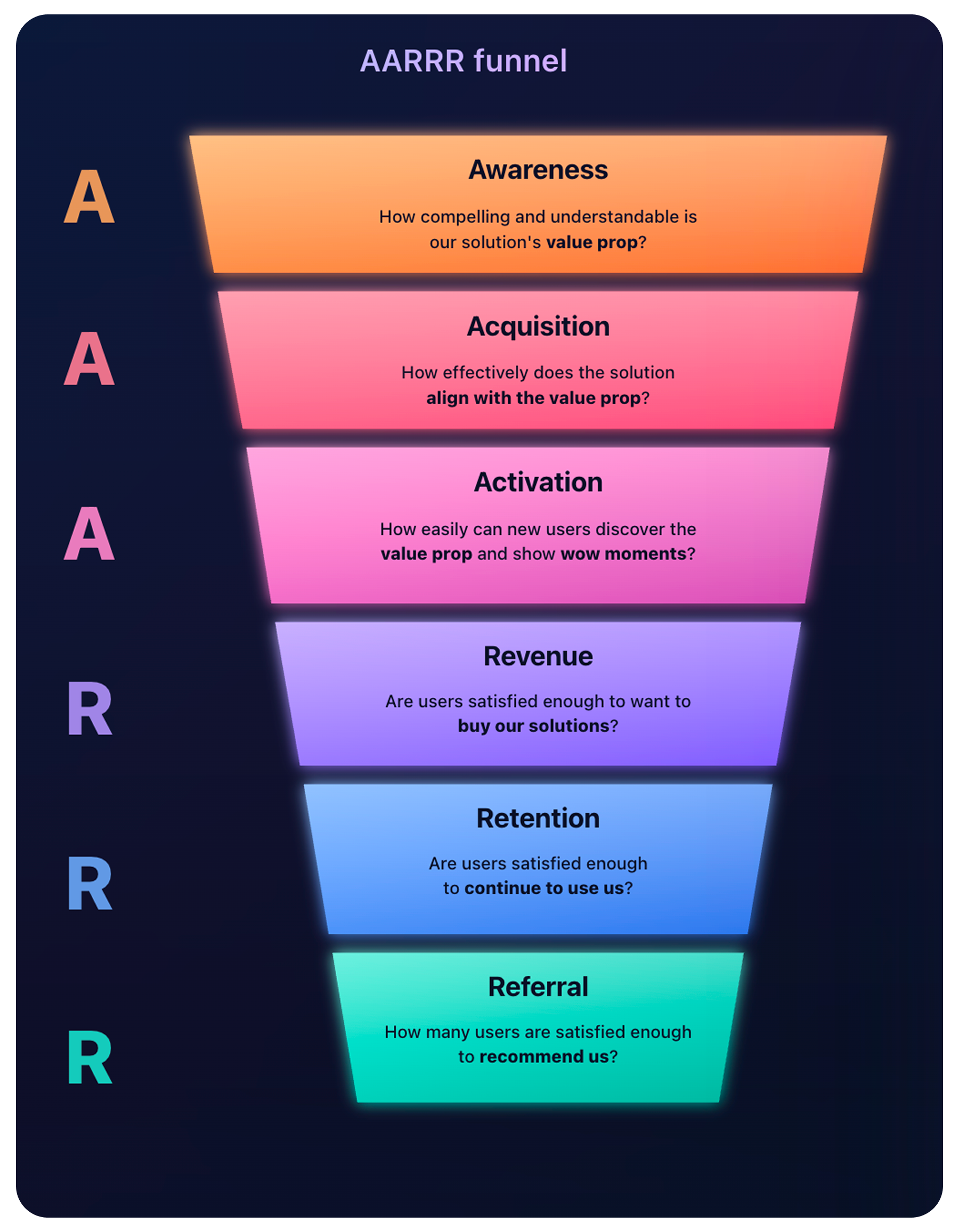
A successful AI strategy leads to quantifiable impact. We should anchor every significant design decision in measurable outcomes.
Metrics drive responsible AI design
We use CSAT (Customer Satisfaction) and SUS (System Usability Scale) to track how effectively users interact with agentic systems. These metrics ensure AI-driven tools meet or exceed desired adoption rates to validate that emerging technology meets real user needs early in the cycle. We can also use PIRATE metrics to ensure that what we deliver confirms the value props we sold and to drive engagement as we incrementally expose new features. AI is moving fast.
Metrics are how we know we're moving in the right direction.
Compliance and ethics
AI governance does not replace traditional standards — it extends them. We can integrate WCAG, ADA, and HIPAA compliance into the AI development lifecycle by defining the level of compliance Claude needs to consider so we ensure that emerging technologies remain accessible and ethical for all users.
Influence on the roadmap
This process places design and engineering earlier in the process so they can co-create solutions and consider design and technical limitations earlier in the process. Because of early-stage prototyping, the cross-functional team can see and align on the same vision earlier and better understand what’s needed to deliver on roadmap initiatives.
As a result, solutions can be better thought out, thereby lessening the chance that a design or engineering issue may pop up later in the process that slows the effort or entirely blocks aspects of the solution.
Key takeaways
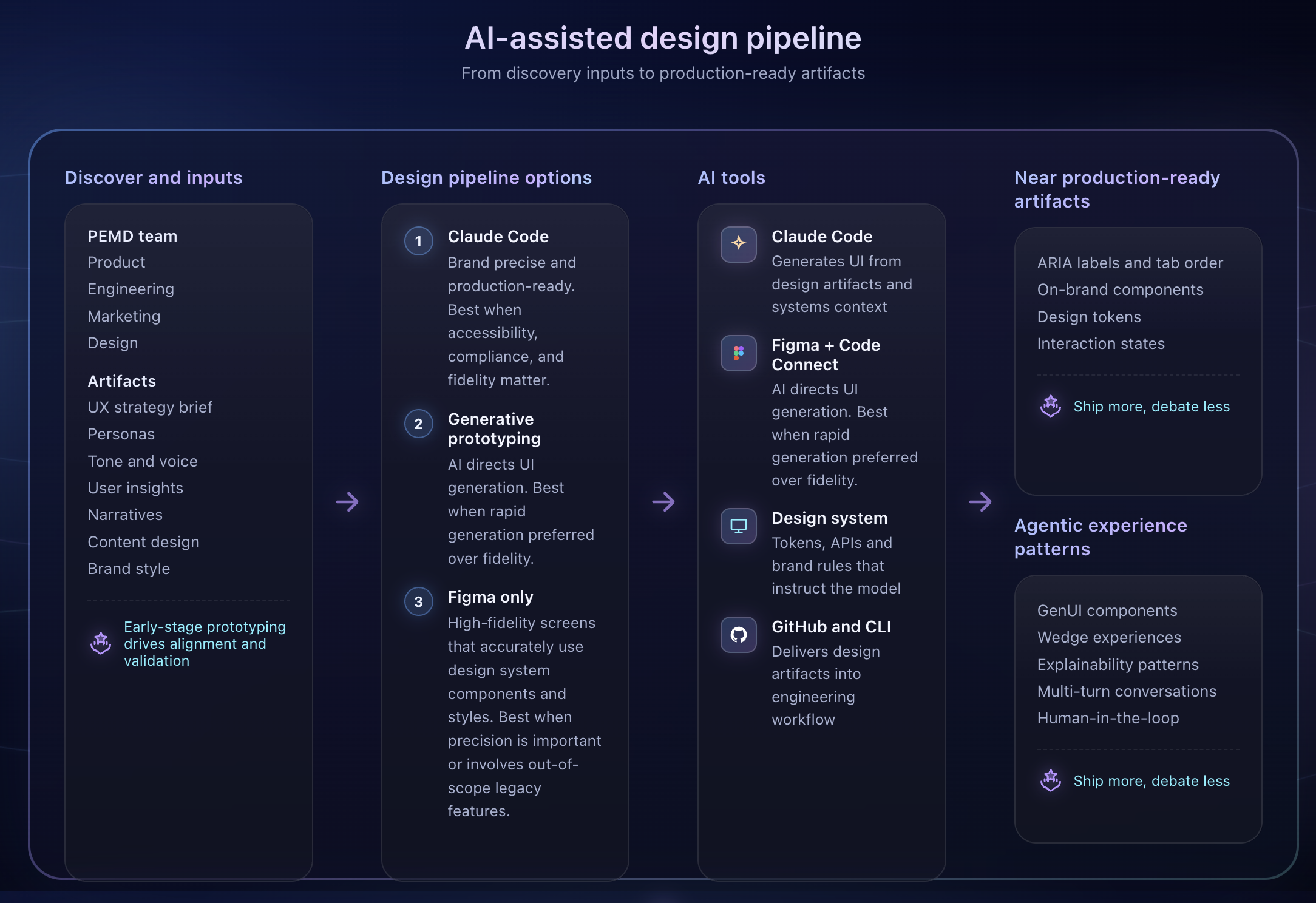
When design operates this way — earlier in the process, closer to the model, and anchored in measurable outcomes — teams ship more, debate less, and stay aligned on what "on-brand" actually means at the speed AI requires.
From discovery to delivery — how design, AI tools, and engineering work together to ship agentic products